Sharing link
The personal sharing link is available on Pro and Business plans.
Your sharing link is a personal file reception link. Share it with anyone to allow them to send you files securely — without exposing your email address.
The sender does not need to set a password to send you files. It is the simplest way to receive encrypted files from other people!
How it works
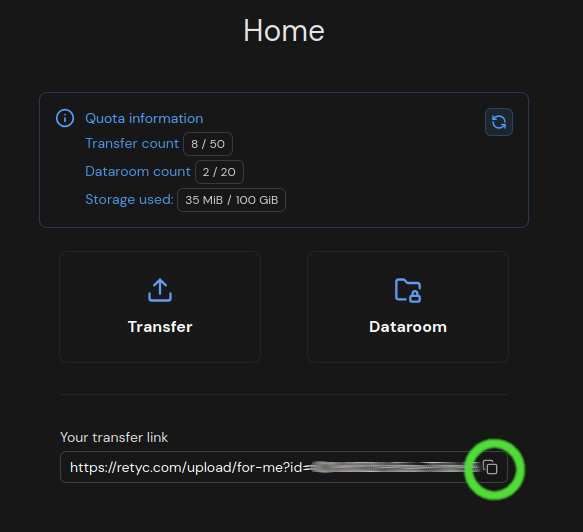
Each eligible Retyc account has a unique link, accessible from Dashboard > Your transfer link.
When someone opens this link, they see a simple upload form. They drop their files and click on Send!. You find them encrypted in your dashboard.
You share your link
        ↓
Sender opens the link → drops their files → clicks Send!
        ↓
Files are encrypted with your public key
        ↓
You find them in Dashboard > Transfers > Inbox
Getting your link
- Log in to your Retyc account
- Go to Dashboard > Your transfer link
- Click on Copy transfer link
- Share this link with your contacts (email, email signature, website…)
What the sender sees
The sender arrives on a page titled Use the form to transfer your files. The form offers them:
- A file drop area (Drop your files here)
- A Title field (optional, not encrypted)
- A Message field (optional, encrypted)
- The Encrypt with my key checkbox if they have a Retyc account
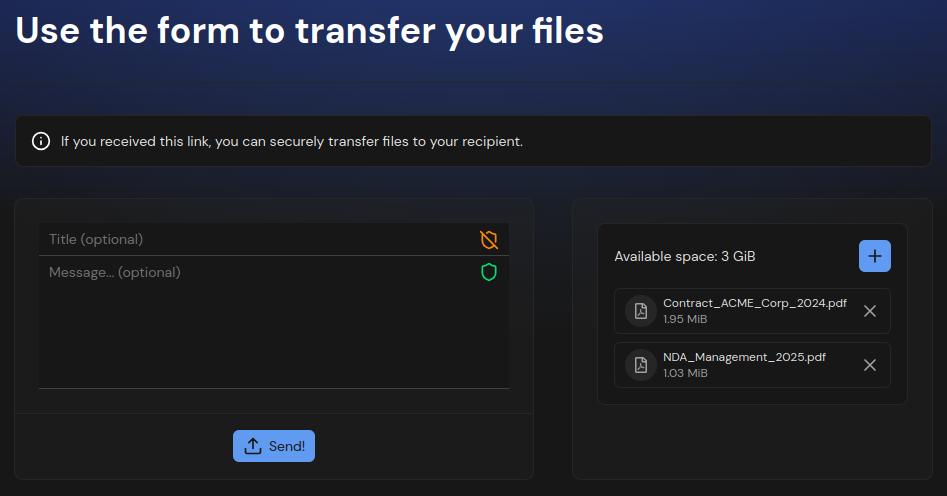
If the sender is not logged in to a Retyc account, an email code verification (OTP) may be required before sending.
Privacy
Your email address is never exposed to the sender. The link only contains a technical identifier associated with your public key.
Receiving the files
Files sent via your personal link appear in Dashboard > Transfers > Inbox. Unlock your key with your passphrase to decrypt and download them.
Typical use cases
- Client → Service provider: a client sends documents
- Application: a recruiter shares their link to receive CVs
- One-time collection: securely receiving supporting documents