Send files
Public transfer is the standard mode for sending files to one or more recipients via a secure link.
Sending transfers is available from the Solo plan. With a free account, you can receive files and upload to the deposit links and forms shared with you, but not create transfers.
For optimal security, we recommend adding recipients who have a Retyc account. This allows files to be automatically encrypted with their public keys, and an email notification to be sent to them. In addition, it will not be necessary to communicate a password separately.
Accessing the send form
- Directly: app.retyc.com/upload
- Dashboard: Transfer > Add
Uploading your files
Drag and drop your files into the Drop your files here area, or click on it to browse your folders. Multiple files can be added in a single session. The maximum size per file depends on your plan.
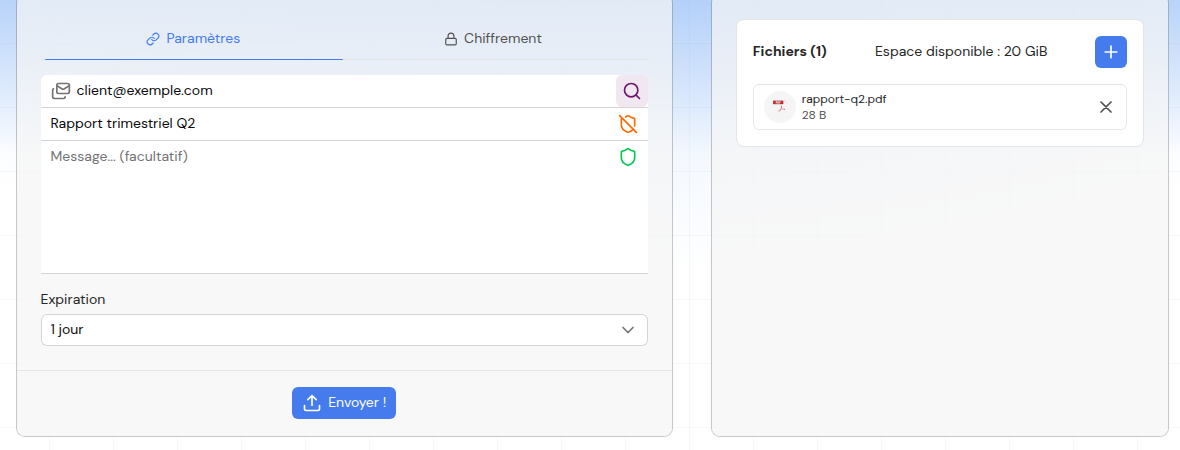
The form is organized into two tabs: Settings (recipients, title, message, expiration) and Encryption (encrypt with your key, password). The list of added files is shown on the right.
Available options (Settings section)
Click on Settings to display the following fields:
Recipients (emails)
Enter up to 5 email addresses. Only these people will be able to download the files (after logging in to their Retyc account). Without an email, the link is public and accessible to anyone who has it.
When recipients are entered, Retyc sends them an email notification.
If the recipients do not have a Retyc account, a password will be required to encrypt the data.
Title (optional)
Displayed on the download page. The title is not encrypted — do not include sensitive information in it.
Message (optional)
Note attached to the files, visible to recipients. The message is end-to-end encrypted: only the recipient can read it.
Use a password
Protects the link with a password that the recipient will need to enter. Minimum 8 characters if no email address is entered.
Label
If your organization has defined labels, a Label field appears in the form. The label classifies the transfer and can enforce rules (allowed recipients, maximum expiration, account-less access), displayed below the field and checked at send time.

Expiration
Duration during which the link remains active. Upon expiration, the files are deleted from Retyc's servers.
Encryption section
Encrypt with my key — adds your own public key to the encryption recipients. You will then be able to decrypt and download your own files from your dashboard.
If you do not encrypt with your key, you will not be able to access your files after sending. This option is strongly recommended to be able to retrieve your files if needed.
Starting the send
Click on Send!. The progress is displayed file by file. Once complete, you are taken to the confirmation page with the sharing link.
What happens on the encryption side?
- Retyc generates a unique session key for this transfer
- Each file is encrypted in the browser with this key
- The session key is encrypted with the public keys of each recipient
- Encrypted files and encrypted keys are sent to Retyc's servers
- Keys never travel in plain text
See End-to-end encryption for more details.